

docker Daddy: architecture
/ 5 min read
Table of Contents
docker -> ephemeral it is!
docker Daddy, the first intellectual checkpoint in many people’s computing journey, is nothing but a lightweight and easy way of running processes in isolation, called as containers. you might think of virtual-machine(VM) but unlike a VM, here happens no hardware emulation and docker uses the OS/kernel of the host machine, making it demand less compute.
architecture
docker Engine, which is the heart of the tool consists of
- docker CLI
- docker daemon
the client types the command using the CLI and the request reaches the docker daemon which uses containerd(written in go) under the hood for managing containers . containerd uses containerd-shim as a babysitter which keeps containers alive during daemon crashes, errors,etc which again utilizes runc(a low level runtime binary) inorder to spawn the container process.
if you want to spawn x containers then x amount of runc will be spawned as in the form of binary commands -> managed by a single containerd but runc only takes part in spawning the container as a process, not in the execution.
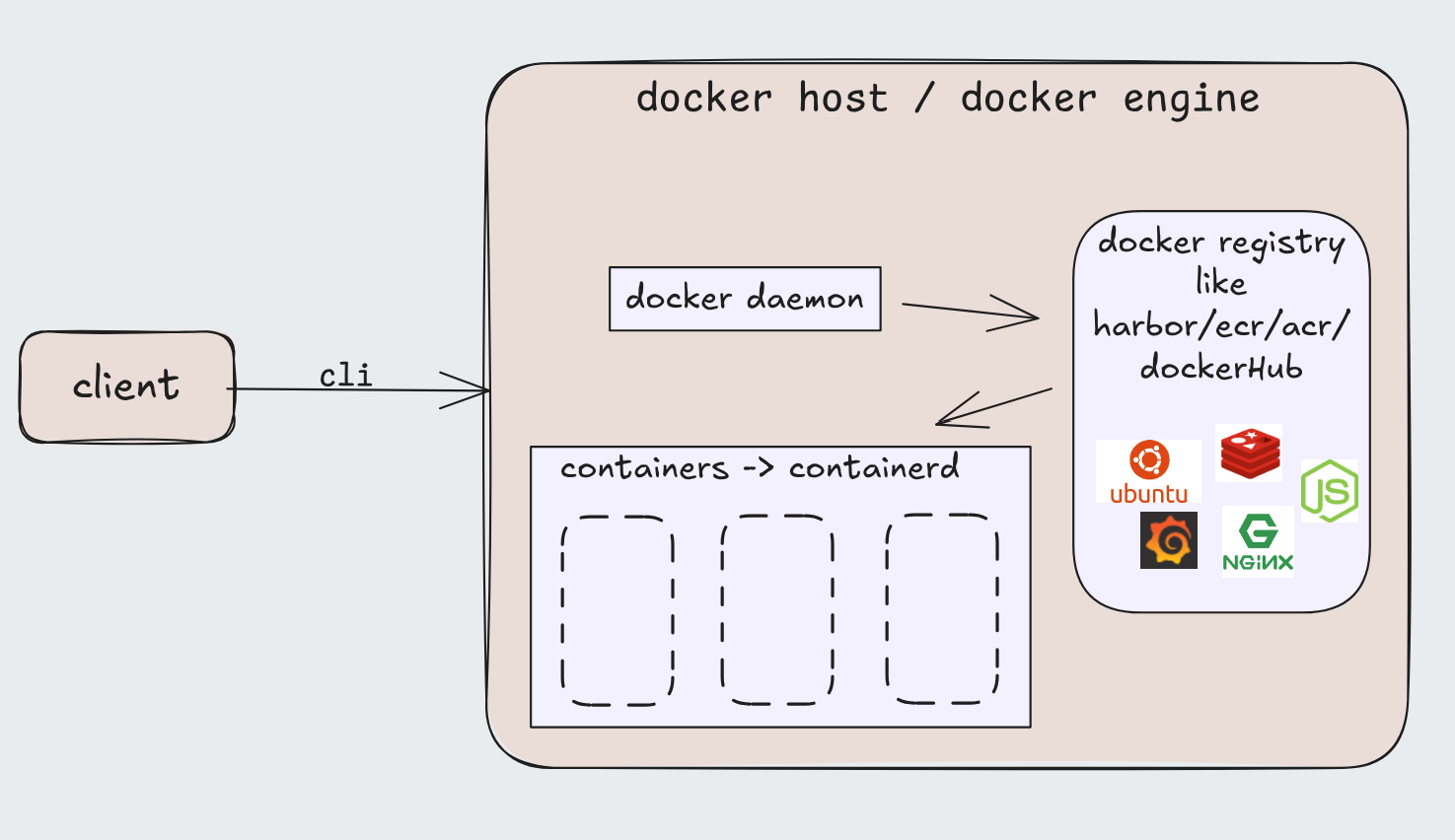
The daemon manages the internals as in -
- Image Management: Downloads, stores, and manages container images.
- Container Lifecycle: Creates, starts, stops, and deletes containers.
- Execution: Uses low-level runtimes (like runc) to run containers.
- Storage: Manages container file systems and snapshots.
- Networking: Handles network attachment for containers.
now there is (keeping it very short just for the jist)-
** storage driver -> manages the container’s root filesystem. Takes image layers (read-only) and adds a writable layer on top (using overlay2) to present the container’s root dir(/)
** volume driver -> containers are ephemeral(short lived) but whatif u want to use the data/logs/information after a container stops or crashes. To not complicate- they are folders defined by the user that live on the host (or remote storage) and are mounted into the container
you can also network in docker(linkedin_lite) to be covered in the next blog; there are 3 main types that I’ve heard ( bridge(default), host, overlay)
what containers are made from-
just cgroup and namespaces
cgroup or control group
help in metering and limiting the resources of the process and are native to the kernel. the limits are applied to a cgroups but memory allocation happens based on the individual processes…each process gets allocated a virtual memory by the kernel and a page(generally 4kb) is charged to the cgroup when memory is tried to be accessed after a page fault. Cross the limit applied → OOM(out of memory) kills the process, no mercy!
so we have
- file memory - something accessed from the disk
- anonymous memory - malloc or memory explicitly asked from the kernel(including stack and heap of each process)
- active memory - everything is inside active memory first but then the kernel optimizes it by shifting the less used shit to inactive memory
we can count the memory used by each process or a group of them in the form of page. when multiple cgroup are using the same page the cost is born by the first cgroup which demanded it (shifts to the next cgroup - incase this cgroup gets terminated)
- cgroup defines limits…soft(memory.high) and hard(memory.max) but docker only has hard limit process terminates on hitting the hard limit (OOM)…so when containers hit the hard limit, kernel kills a random process inside the container, which is why we only put one service in one container to know what caused the OOM issue.
as in for the soft limit the kernel doesn’t stop the process but aggressively starts to drop pages stored for that cgroup
- blkio cgroup - it takes care of i/o operations for each group like read and write, sync and async from the block devices;
namespaces
A namespace is basically a kernel isolation mechanism that gives a process a private view of some global system resource
some arbitrary concept for flexing-
- PID namespace: Each namespace has its own PID numbering PID 1 exists inside every PID namespace
On the host system, PID 1 is the first process the kernel starts at boot. Historically, it was /sbin/init. On modern Linux: usually systemd or some other init process like sysinit, runit, OpenRC,etc
-
Mount namespace: well there is one real file system(one of the host) and the kernel lies to the processes by telling them they have their own root(/) file system. Inside each container the root dir(/) is backed up by the overlayfs which comes from the overlay2 storage driver -> making the filesystem invisible to other containers.
the /tmp dir inside the container is isolated and managed by the mount namespace, but outside, depending on the use-case can be scoped per user or per service by the systemd or init process.
-
uts namespace: lets the container have its own hostname
-
ipc namespace: i didn’t go too deep, its just inter process communication namespace which provides isolation to the processes so that one cannot access memory of other thereby preventing data leak.
-
Network namespace: Own interfaces, routing tables, iptables = eth0
When you run a container, Docker (via runc) does roughly:
clone(  CLONE_NEWNS   |   // mount  CLONE_NEWPID  |   // pid  CLONE_NEWNET  |   // network  CLONE_NEWUTS  |   // hostname  CLONE_NEWIPC  |   // ipc  CLONE_NEWUSER     // user (optional))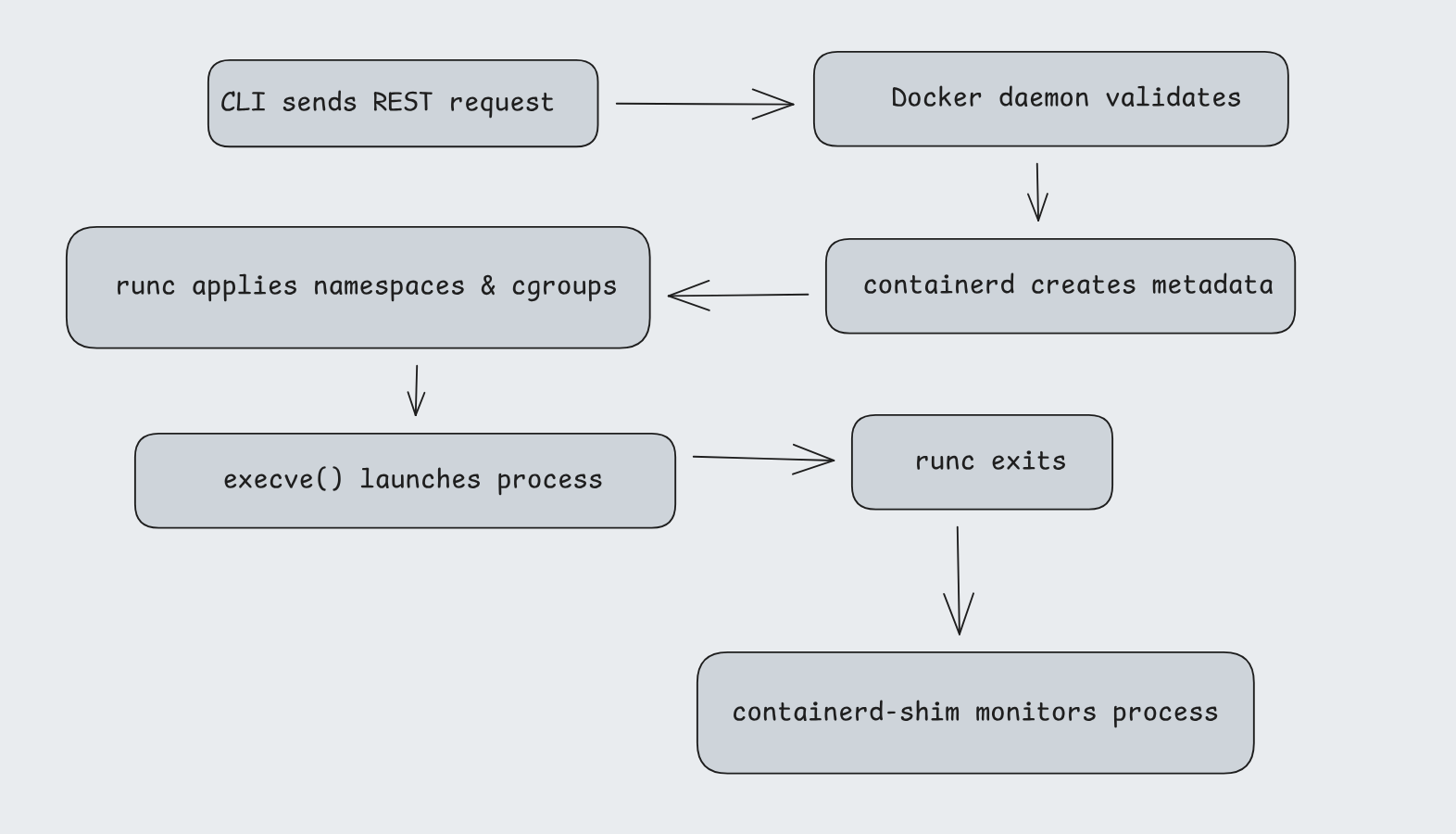
Docker oR (Podman, nerdctl)
there are alternatives to docker -
-
Podman: it just runs without the daemon(dockerd), every container is just a child process of your shell. its fully open source, but i never tried it, thou i’ve heard that podman is just all the docker commands with podman in-place of docker. lol
-
nerdctl: i never explored it except for the fact that its built on top of containerd.
collection of my learnings from blogs and tut’s on the internet. learned alot from this one - what are containers made of #2016
sayoonara…