

docker Daddy: networking
/ 4 min read
Table of Contents
I highly recommend u looking into the docker’s architecture blog if u are new!
Networking: the need-
Assume u have two containers which want to talk to each other? the thing is u want an isolated yet controlled delivery so the data-transfer stays in bw the two containers only: there-which docker introduces its virtual-networking -> providing a logical isolation bw the containers and the host;
Docker creates a virtual-ethernet(veth), whenever u spawn a container and attaches one end to the container’s network namespace while other to docker0 which serves as the default bridge network for connectivity;
Containers attached to the default bridge have access to network services outside the Docker host. They use “masquerading” which means, if the Docker host has Internet access, no additional configuration is needed for the container to have Internet access. Two containers can talk to each other on default bridge by their respective ip’s not by container name, unlike user defined networks where we can talk using container names;
Flow of Packets -
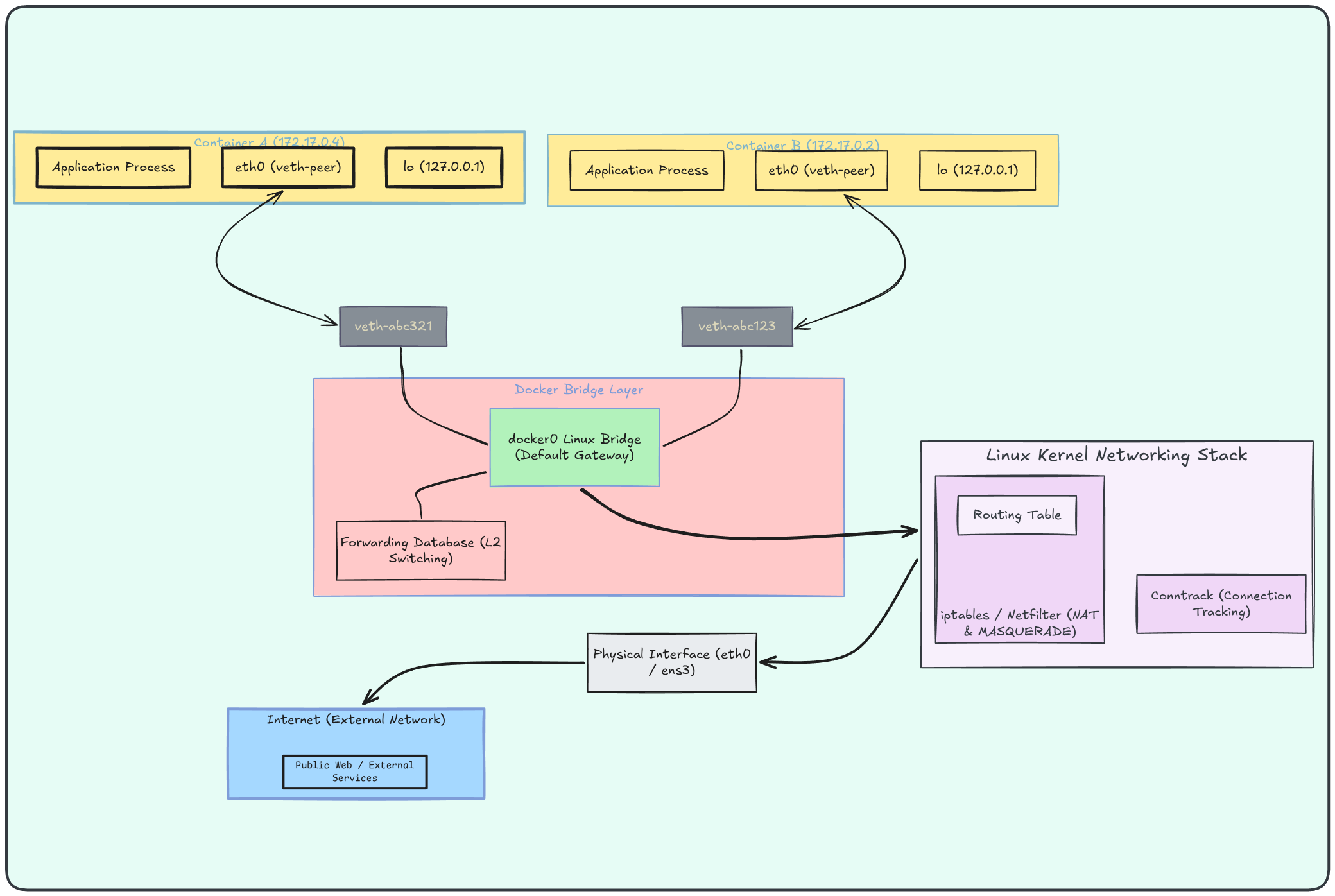
with the above diagram, a vague idea of how things process must’ve been roughly imbibed on ur blank canvas - lets take a real world example
For eg - container wants to ping ahem-ahem(66.254.114.41), lets take not so distracting example like Google’s DNS(.8.8.8.8)
Container A (172.17.0.4)wants to reach 8.8.8.8:$> curl 8.8.8.8=> just keep in mind these points bef4 we move on to the exact flow -
-
Each container is connected to docker0 through a veth (virtual Ethernet) pair. Packets leaving the container traverse this virtual ethernet before reaching the bridge.
-
docker0 has a bridge network which works exactly like a switch device in a LAN.
-
It operates using: MAC addresses of the source(container) and the destination(host machine in our case) using which it maintains a FDB (Forwarding Database) to be used in later calls.
The structure of FDB somewhere looks like this -
Container MAC Address InterfaceA aa:bb veth-abc321B cc:dd veth-abc123 -
docker0 just does switching, if it wants to connect to services within the same network, routing comes into picture when the IP demanded is not within the active network;
-
-
Step 1: eg- in our case containerA wants to curl .8.8.8.8 so the kernel inside the container checks which route matches to the IP using the routing table, if no route is found it uses the default gateway;
-
Step 2: The container’s kernel knows: that it should route to eg - 172.17.0.1(as its the default gateway) but doesn’t know MAC of 172.17.0.1, so it asks: Who has 172.17.0.1? via ARP(Address Resolution Protocol): When a computer needs to send data to a specific IP address on the local network, it broadcasts an “ARP request” asking, “Who has this IP address?” The device assigned to that IP responds with its physical MAC address.
-
Step 3: Once ARP resolves the gateway’s MAC address -> Container builds the Ethernet Frame
172.17.0.1 -> bb:bb:bb:bbEthernet Frame----------------------------------SRC MAC : aa:aa:aa:aaDST MAC : belongs to docker0----------------------------------
IP Packet----------------------------------SRC IP : 172.17.0.4DST IP : 8.8.8.8----------------------------------because the destination MAC belongs to the bridge gateway interface, the frame is therefore passed upward into the Linux networking stack -> Layer 2 Switching Ends and Layer 3 Routing Begins
- Step 4: The host kernel now extracts the IP packet sent above and performs a routing lookup.
default via 192.168.1.1 dev wlan0172.17.0.0/16 dev docker0192.168.1.0/24 dev wlan0The host kernel asks: How do I reach 8.8.8.8 -> Use the default route. which means: Send packet through wlan0(router)
- Step 5: The NAT Problem Appears becuz- The internet has no idea how to route packets back to our SRC IP: 172.17.0.4 specified in the ethernet frame Google cannot send replies directly to a Docker container therefore without NAT, the response would never return.
The kernel rewrites:
BEFORE NAT
SRC IP = 172.17.0.4DST IP = 8.8.8.8
into:
AFTER NAT
SRC IP = 192.168.1.100DST IP = 8.8.8.8
here: 192.168.1.100 is the host machine’s address. To the internet, the packet now appears to originate from the host rather than the container. this is called as MASQUERADE-ING. also the host machine stores this change in packet using a connection-tracking table:
The return journey is just the same steps in reverse, NAT rewrites the destination back to the container IP, the bridge forwards it through the right veth pair, and the packet lands home, now read the steps backwards to understand how the response is sent back to the containers; i am sorry for being so lazy!
there are many types of connections that docker can maintain like
- bridge,
- host,
- overlay,
- macvlan,
- ipvlan
which honestly are not todays topic of discussion.
sayoonara…