
from ncmpc to rmpc : a better mpd tui
/ 3 min read
Table of Contents
why this NOW?
some songs on loop help me relax.
when i switched to arch, listening from the web->yt/spotify felt good but i wanted shit done from my terminal(following the vocal tribe of linux) and also if u need a gui to do something, something is wrong. So i installed mpd(music player daemon) and ncmpc(Ncurses Music Player Client).
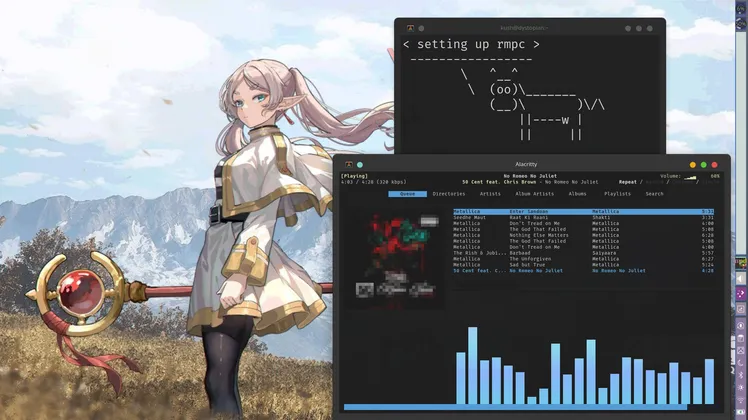
The feeling was good, oddly satisfying, i got what i wanted, until while browsing r/unixporn, i saw a riced setup - having rmpc(Rusty Music Player Client), 100% in rust -----------------------My seismic juices erupted just know that ncmpc is not customizable(u can just change the bg and fg colors)…but this thing, it had everything, album art + visual channels + cava integration + playlist + queue + external command support the thing was customizable to granularity. // ps i knew ncmpcpp, just that the mood swings didnt happen for it.
So i spent the last 2 days going through the docs and setting it up - tried making a few themes(basically copying things from other people)..
reproduce it!
u need mpd as a necessity cuz how else will any music player work? and configure it accordingly as u seem fit…port or socket is a choice u make(i prefer sockets)
sudo pacman -Syu mpd && mkdir -p ~/.config/mpd && touch ~/.config/mpd/mpd.confsetting up mpd…is easy af (watch a tut or just copy the default.conf and edit accordingly)
or just copy mine config which is socket based
now we just run the mpd.service for the current user(can do system-wide too but user wide is a lot cleaner for all this (again a personal preference it is))
systemctl --user enable --now mpdnow lets install our white knight - rmpc along with cava(cuz who doesnt like the audio bars) and also picard which is an audio tagger tool, useful in finding the details + album art for any song ---- try to integrate them in ur custom config.
sudo pacman -S rmpc cava picard && mkdir -p ~/.config/rmpcfor info about custom config head to rmpc site or copy the rmpc folder from my dotifles and place them in ~/.config/rmpc/ inorder to change the theme just replace the theme name in config.ron file; u can modify the bindings in the same file too
The bindings are very similar to vim, open the helper with ? to see the bindings ; i copied a good chunk of config from the rmpc’s creator and modified them a little -
- Y for searching in YT about the current song being played.
- P for searching in picard about the current song and updating its details. also a notif on song change and all that.
now just go to the /scripts folder and give execute permission for picard and yt-search bash script to work.
chmod +x scripts/*Everything is sorted now u just need to install high quality music (flac or aiff) and just enjoy…i am using alacritty for which the album art is ansii generated > would work perfectly with kitty or any terminal with graphics support